

Understanding the Evolution of What Happened to Worx Robotic Lawn Mower? Guide in 2026
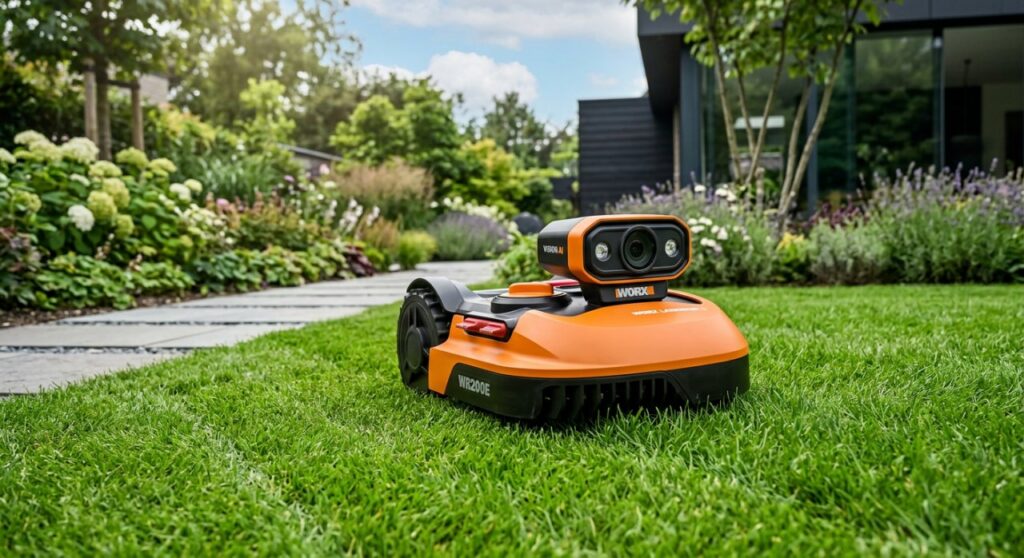
The Worx robotic lawn mower line, famously known as Landroid, has undergone a massive technological shift from traditional perimeter-wire systems to AI-driven, camera-based navigation. While older models remain supported via the Worx Landroid App, the brand has pivoted toward the Landroid Vision series to eliminate installation headaches and improve obstacle detection.
Expert Summary for August 2026
- Technology Shift: Worx has transitioned from “Boundary Wire” models to the Landroid Vision, which uses a Full HD camera and AI to “see” the grass.
- Firmware Criticality: Many reported “issues” are solved by Over-the-Air (OTA) updates; always ensure your mower is connected to 2.4GHz Wi-Fi.
- Hardware Compatibility: The Worx PowerShare battery system remains the universal standard, allowing you to swap batteries between your mower and other Worx tools.
- Support Status: Legacy wired models are still manufactured and supported, but the industry trend is moving toward “drop-and-go” robotic solutions.
How to Navigate the Changes to Your What Happened to Worx Robotic Lawn Mower? Guide
If you are wondering what happened to worx robotic lawn mower performance or availability, it usually boils down to a transition in hardware or a need for a software refresh. Follow these steps to ensure your robotic mower is up-to-date and functioning at peak efficiency in 2026.
Step 1: Identify Your Landroid Generation
Before troubleshooting or upgrading, you must determine if you own a Boundary Wire model or the newer Landroid Vision. This dictates how the machine perceives its environment and what software it requires.
- Check the Front: If it has a camera lens, it is a Vision model.
- Check the Underside: Older models rely on magnetic sensors to detect the wire.
- Verify the Serial Number: Log into the Worx Landroid App to see the specific model generation and warranty status.
Step 2: Perform a Mandatory Firmware Update
Many users believe their mower has “broken” when, in reality, the cloud-based AI requires an update to handle new lawn patterns or connectivity protocols.
- Connect to Wi-Fi: Move the mower close to your router or use a Wi-Fi extender.
- Open the App: Navigate to the settings menu and select “Firmware Update.”
- Manual USB Update: If the Wi-Fi fails, download the firmware from the Worx website onto a FAT32 formatted USB drive and plug it into the mower’s rear port.
- Restart: Power the unit off and on to initialize the new code.
Step 3: Optimize the ACS (Anti-Collision System)
A common reason people search for what happened to worx robotic lawn mower is because the unit starts bumping into objects. The ACS module is an add-on for older models but built-in for newer ones.
- Clean the Sensors: Use a damp cloth to wipe the ultrasonic sensors or camera lens.
- Check for Obstructions: Ensure tall weeds or debris aren’t “blinding” the AI.
- Adjust Sensitivity: Use the app to toggle the ACS sensitivity if the mower is being too cautious around lawn ornaments.
Step 4: Maintain the PowerShare Battery Health
The “death” of many robotic mowers is simply a depleted lithium-ion cell. Because Worx uses the PowerShare platform, replacing the battery is easier than with closed-system competitors.
- Inspect the Terminals: Look for corrosion on the charging base pins and the mower’s contact plates.
- Test the Voltage: If the mower won’t hold a charge, swap the battery with one from your Worx drill or leaf blower to see if the mower powers up.
- Winter Storage: Never leave the battery in the mower during freezing temperatures; store it at roughly 50% charge in a climate-controlled area.
Comparing Worx Landroid Models in 2026
| Feature | Legacy Landroid (WR Series) | Landroid Vision (WR2XX) |
|---|---|---|
| Navigation | Perimeter Boundary Wire | AI Camera / Neural Network |
| Setup Time | 3–6 Hours (Digging/Pinning) | < 10 Minutes (Drop & Go) |
| Obstacle Avoidance | Optional ACS Module | Integrated AI Vision |
| Multi-Zone | Via Wire Logic | Via RFID Tags / Visual Cues |
| Best For | Simple, Fenced Lawns | Complex Lawns with Paths |
Tools and Materials Needed for Maintenance
| Tool/Material | Purpose |
|---|---|
| Worx Landroid App | Managing schedules and firmware updates. |
| Microfiber Cloth | Cleaning camera lenses and ultrasonic sensors. |
| Replacement Blades | Ensuring a clean cut (replace every 2-3 months). |
| USB Drive (FAT32) | For manual firmware installations. |
| 20V PowerShare Battery | Backup power source for testing. |
Pro Tips for What Happened to Worx Robotic Lawn Mower? Guide Owners
- The “Rain Delay” Secret: If your mower is leaving ruts, increase the Rain Delay setting in the app. This prevents the mower from starting until the grass is dry enough to support its weight.
- Edge Cut Optimization: The Cut-to-Edge feature is a signature of Worx. Ensure your boundary wire is exactly 26cm from obstacles (using the provided distance gauge) to maximize this benefit.
- Wi-Fi 2.4GHz Only: Most Worx mowers cannot connect to 5GHz bands. If your setup fails, split your router bands to ensure a stable connection for the mower.
Common Mistakes to Avoid
- Ignoring Blade Wear: Dull blades tear the grass rather than cutting it, leading to a brown, sickly-looking lawn. Boldly replace your blades at the start of every season.
- Improper Base Placement: The charging station must be on level ground. If it tilts, the mower may fail to “dock” correctly, leading to a dead battery.
- Burying the Wire Too Deep: For legacy models, burying the wire more than 2 inches deep can weaken the signal, causing “Wire Missing” errors.
FAQ: Everything You Need to Know About What Happened to Worx Robotic Lawn Mower? Guide
Why is my Worx Landroid “Missing Wire”?
This is usually caused by a break in the perimeter loop or a faulty charging base. Check the LED on the base: a solid green light means the loop is intact, while a flashing green or red light indicates a break or power issue.
Did Worx discontinue the robotic mower?
No, Worx has not discontinued the line. They have simply shifted focus toward Landroid Vision technology to compete with high-end, wire-free brands like Husqvarna and EcoVacs.
Can I use my old Landroid battery in the new Vision?
Yes. One of the biggest advantages of what happened to worx robotic lawn mower development is the continued use of the 20V PowerShare battery, which is cross-compatible across almost all models.
How do I reset my Landroid after an error?
To perform a hard reset, turn the mower off, remove the battery for 30 seconds, reinsert it, and power the unit back on. Enter your PIN to clear the “locked” status.
Does the Landroid Vision work at night?
The Landroid Vision includes an optional Fiat Lux headlight accessory that allows the camera to “see” and mow safely in total darkness without hitting nocturnal animals.
Conclusion: The Future of Your Lawn Care
Understanding what happened to worx robotic lawn mower models reveals a brand in the middle of a high-tech glow-up. By moving away from restrictive wires and toward AI-driven vision, Worx has made robotic mowing accessible to those with complex yards. To keep your mower running perfectly in 2026, prioritize firmware updates, maintain your PowerShare batteries, and keep those camera lenses clean.
Ready to upgrade your lawn game? Check your Worx Landroid App for the latest firmware or explore the Landroid Vision accessories to take your automation to the next level.